The text read off it
[page 43]
| Sending Area Pictorial | Sending Data before MOVE | Sending Data after MOVE | Receiving Area Pictorial | Receiving Data before MOVE | Receiving Data after MOVE |
|---|---|---|---|---|---|
| 99V99 | 1234 | 1234 | 99V99 | 8765 | 1234 |
| 99V99 | 1234 | 1234 | 99V9 | 876 | 123 |
| 9V9 | 12 | 12 | 99V99 | 8765 | 0120 |
| AAAAA | JONES | JONES | AAAAA | VWXYZ | JONES |
| 99999 | 01234 | 01234 | 999V9 | 7777 | 2340 |
| AAA | RUN | RUN | AAAXX | JOB #2 | RUN |
| AAAAA | BLACK | BLACK | AAA | RED | BLA |
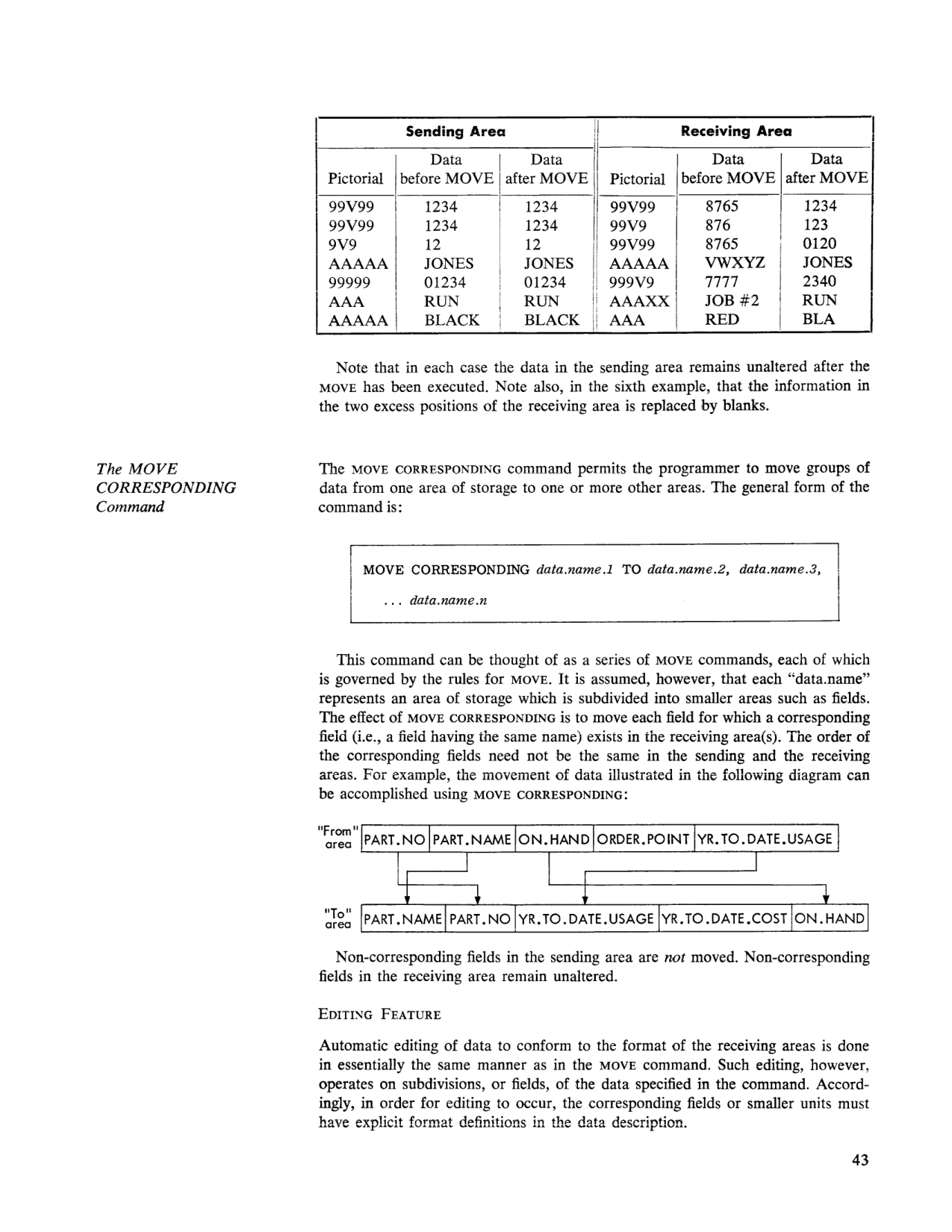 Sending/Receiving Area MOVE editing examples, and diagram of MOVE CORRESPONDING field mapping between a "From" area (PART.NO, PART.NAME, ON.HAND, ORDER.POINT, YR.TO.DATE.USAGE) and a "To" area (PART.NAME, PART.NO, YR.TO.DATE.USAGE, YR.TO.DATE.COST, ON.HAND) (page 43).
Note that in each case the data in the sending area remains unaltered after the MOVE has been executed. Note also, in the sixth example, that the information in the two excess positions of the receiving area is replaced by blanks.
The MOVE CORRESPONDING Command
The MOVE CORRESPONDING command permits the programmer to move groups of data from one area of storage to one or more other areas. The general form of the command is:
MOVE CORRESPONDING data.name.1 TO data.name.2, data.name.3,
    ... data.name.n
This command can be thought of as a series of MOVE commands, each of which is governed by the rules for MOVE. It is assumed, however, that each "data.name" represents an area of storage which is subdivided into smaller areas such as fields. The effect of MOVE CORRESPONDING is to move each field for which a corresponding field (i.e., a field having the same name) exists in the receiving area(s). The order of the corresponding fields need not be the same in the sending and the receiving areas. For example, the movement of data illustrated in the following diagram can be accomplished using MOVE CORRESPONDING:
"From"  | PART.NO | PART.NAME | ON.HAND | ORDER.POINT | YR.TO.DATE.USAGE |
 area

"To"    | PART.NAME | PART.NO | YR.TO.DATE.USAGE | YR.TO.DATE.COST | ON.HAND |
 area
Non-corresponding fields in the sending area are not moved. Non-corresponding fields in the receiving area remain unaltered.
EDITING FEATURE
Automatic editing of data to conform to the format of the receiving areas is done in essentially the same manner as in the MOVE command. Such editing, however, operates on subdivisions, or fields, of the data specified in the command. Accordingly , in order for editing to occur, the corresponding fields or smaller units must have explicit format definitions in the data description.