The text read off it
[page 72]
field would be "single," "married," and "divorced." While these words could actually be placed in the MARITAL.STATUS field, it is more economical of space, and generally more efficient, to use codes. The initial letters M, S, and D were used as codes in this example. Thus, the field MARITAL.STATUS might contain any one of these letters at a given time.
However, so that the programmer can refer to these codes by their names, he must specify in the data description which code corresponds to each name. This may be done in the following manner:
Suppose that the field MARITAL.STATUS has been given the level number 06. The names of the conditions which may be entered into the field must then be assigned a lower level (i.e., a higher number) and entered in the data description immediately following the name of the field. This means that they will be treated as if they were each a subdivision of the field, in accordance with the rules for assigning level numbers, although, in practice, only one condition will be considered at a time. A portion of the data description might then appear as follows:
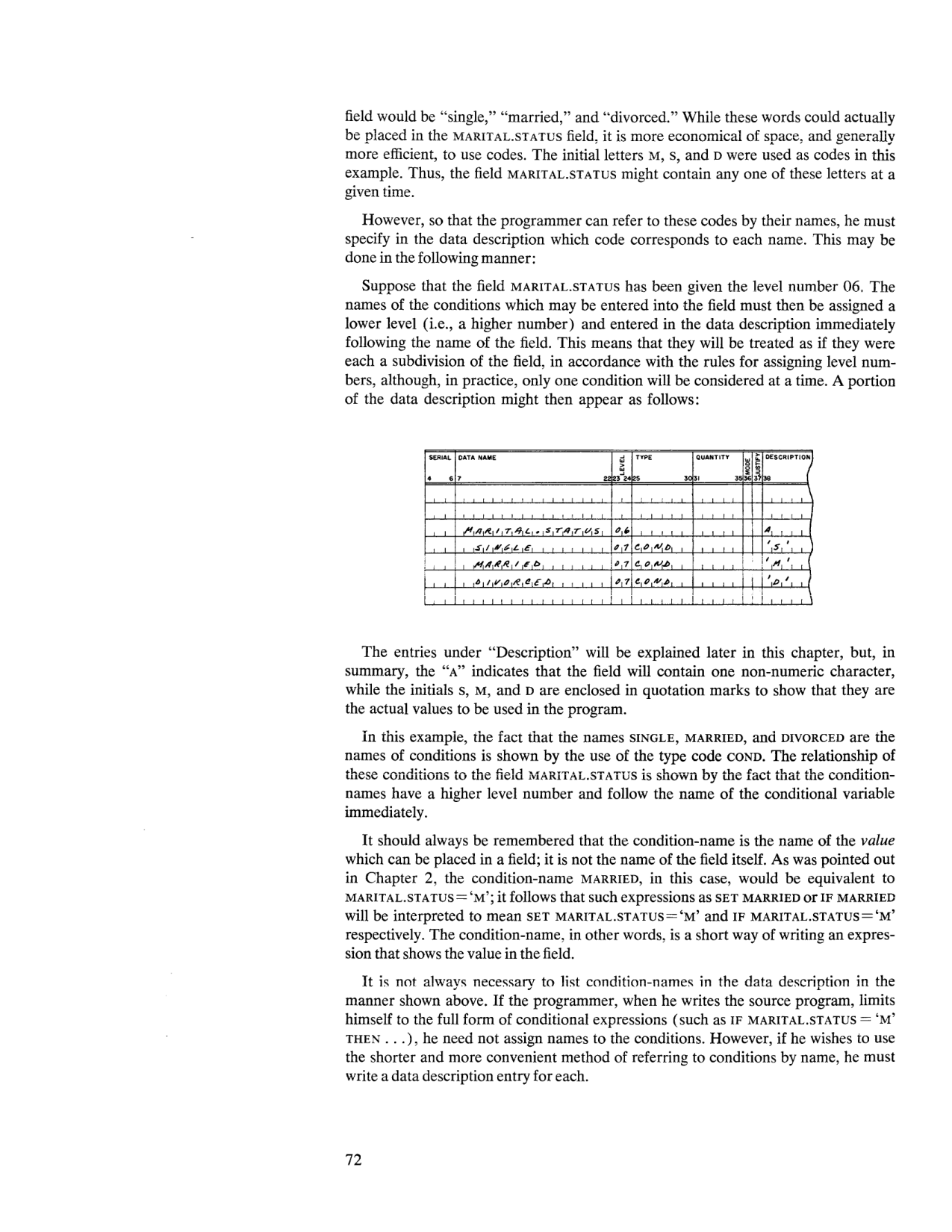 Data description entries for the MARITAL.STATUS conditional variable (page 72).
SERIAL  DATA NAME                    LEVEL  TYPE     QUANTITY  MODE JUST  DESCRIPTION
 4   6  7                         22 23  24 25    30 31    35   36   37  38

        MARITAL.STATUS               0  6                                 A
        SINGLE                       0  7  COND                           'S'
        MARRIED                      0  7  COND                           'M'
        DIVORCED                     0  7  COND                           'D'
The entries under "Description" will be explained later in this chapter, but, in summary, the "A" indicates that the field will contain one non-numeric character, while the initials S, M, and D are enclosed in quotation marks to show that they are the actual values to be used in the program.
In this example, the fact that the names SINGLE, MARRIED, and DIVORCED are the names of conditions is shown by the use of the type code COND. The relationship of these conditions to the field MARITAL.STATUS is shown by the fact that the condition-names have a higher level number and follow the name of the conditional variable immediately.
It should always be remembered that the condition-name is the name of the value which can be placed in a field; it is not the name of the field itself. As was pointed out in Chapter 2, the condition-name MARRIED, in this case, would be equivalent to MARITAL.STATUS = 'M'; it follows that such expressions as SET MARRIED or IF MARRIED will be interpreted to mean SET MARITAL.STATUS='M' and IF MARITAL.STATUS='M' respectively. The condition-name, in other words, is a short way of writing an expression that shows the value in the field.
It is not always necessary to list condition-names in the data description in the manner shown above. If the programmer, when he writes the source program, limits himself to the full form of conditional expressions (such as IF MARITAL.STATUS = 'M' THEN ...), he need not assign names to the conditions. However, if he wishes to use the shorter and more convenient method of referring to conditions by name, he must write a data description entry for each.